
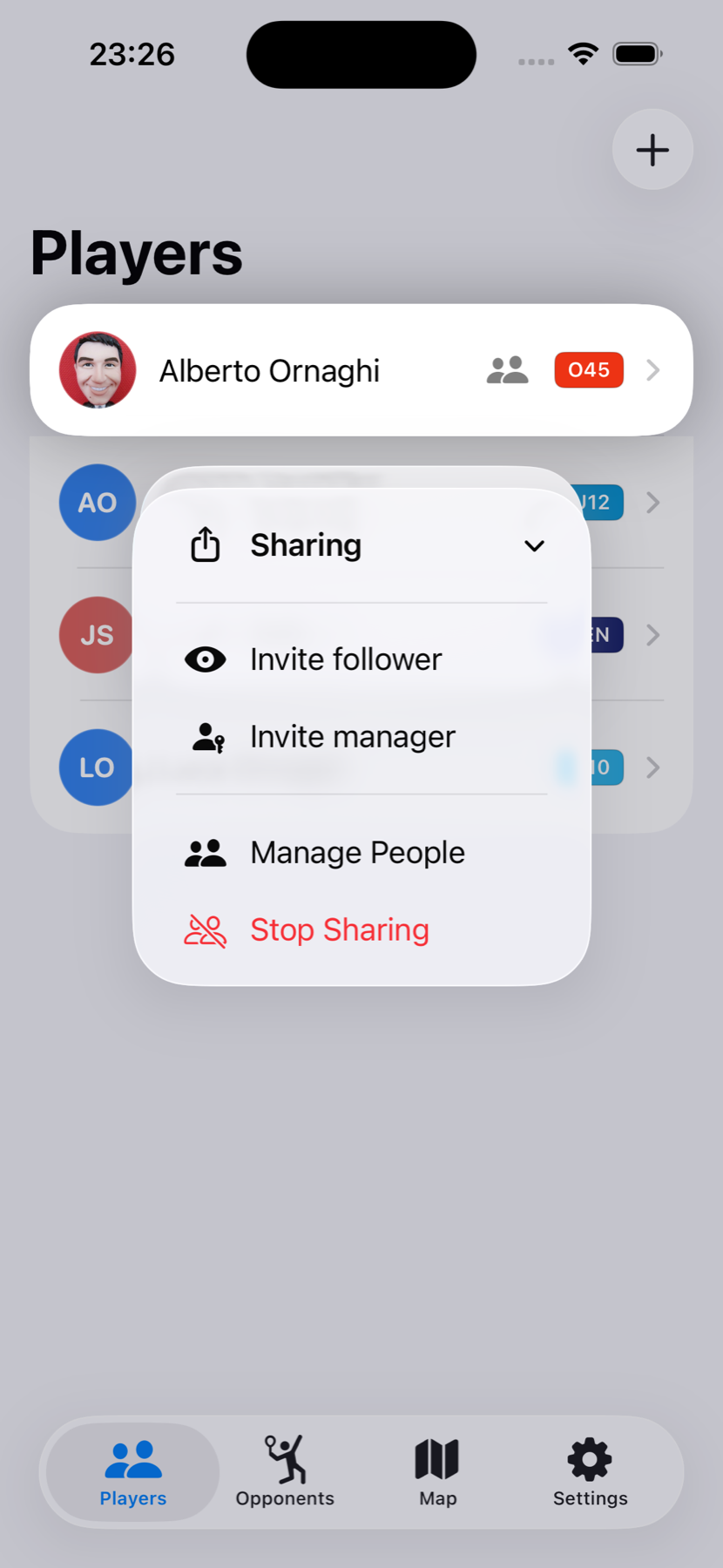
Sharing a player is more useful when each person receives the right level of access. Match Update offers two invitation types: Manager for someone who helps maintain the player’s matches, and Follower for someone who only needs to view them.
A family that takes turns courtside.
Imagine two parents alternating at their child’s matches. The parent who created the player remains the owner. The other parent can be invited as a Manager, allowing either of them to create and score a new match when they are the one beside the court.
Grandparents may want every result and the chance to follow live, but they do not need to change anything. They can join as Followers. A coach can also be a Follower when the goal is simply to review matches, or a Manager if they will sometimes create and score them.
When this helps
Choose different access levels when responsibility moves between people, but you still want one continuous player history and a clear boundary between scoring and viewing.
Two roles, two clear purposes.
Manager
- Create and score new matches for the shared player.
- Edit the player and help maintain their match history.
- Use this role only for someone trusted to make changes.
Follower
- See the shared player and published match history.
- Follow matches without changing the score or player.
- Automatically receive future shared matches in Match Update.
The owner keeps control of sharing. Managers can help with the player and new matches, but they cannot invite additional people or manage the sharing relationship themselves.
Give access according to responsibility.
A useful rule is to start with Follower access. It is enough for grandparents, friends and coaches who only need to watch or review. Choose Manager when the person genuinely needs to create matches or maintain the player’s information.
This keeps collaboration flexible without giving every participant permission to change the shared history.